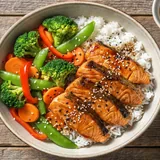
For everyone who gave up on a pantry app

Every pantry app
becomes a chore.

You type in your groceries for a fortnight, life happens, the inventory drifts out of date — and you stop opening it.

HomeBasket never asks you to type anything. Photograph the receipt you were about to throw away and the pantry builds itself. Then it shows you what you can cook tonight from what’s already on the shelf, leaning the way you asked — and plans the whole week when you want it to.

See how it works ↓
2,000+ recipes, matched to your pantry
Whole weeks planned around your pantry
Save recipes from Instagram & TikTok
No food diary. Ever.
Costco Wholesale
Today · 15:48
KSCONVGRYGT
$7.99
ORG ATAULFO
$9.49
1068083 ORG FR EGGS
$7.69
This shop unlocked 6 dinners
Simple process

How it works

01

Snap your receipt

After any shop. Takes 10 seconds. Point your camera, tap, done.

02

Review & confirm

App translates the codes. You approve. Fix anything that's off in two taps.

03

Pantry updates itself

Freshness tracked. List auto-builds. Recipes suggested from what you own.

Four ways in

However your kitchen works,
HomeBasket keeps up.

Snap a receipt
One photo after any shop and your whole basket lands in the pantry — decoded, categorized, expiry clocks started.
Scan a barcode
Point at any package for an instant 0–100 health score with the reasons behind it. No label data? We say so.
Save from social
That reel you bookmarked? Share it to HomeBasket and we tell you what you already have and what's missing.
Just ask
“What should I cook first?” “Do we have eggs?” “How much protein am I buying?” — answered from your own kitchen, stored nowhere.
Why one app

Running a kitchen shouldn't take
an app drawer.

One app to grade your food
A scanner rates products one barcode at a time — and forgets each one the moment you put it back on the shelf.
One app to catch recipes
The reel you saved lands in a recipe keeper that has no idea what's in your fridge — so it can't tell you what's missing.
One app to track the pantry
Which works exactly as long as you keep typing in everything you buy. Week three is where those apps go quiet.
One app for the list
Which starts empty every week, because none of the other three ever tell it what you actually have.

Most of them want their own subscription — and none of them share what they know. But these were never four separate problems. They're one problem, what your household buys, and every answer is already printed on the receipt. One photo feeds the scores, the recipes, the pantry, and next week's list.

Everything in one place

Built for how households
actually work

01 · Pantry

Everything you own,
at a glance.

Every item you've bought, organised by category. Green dots mean fresh, amber means use soon, red means act now.
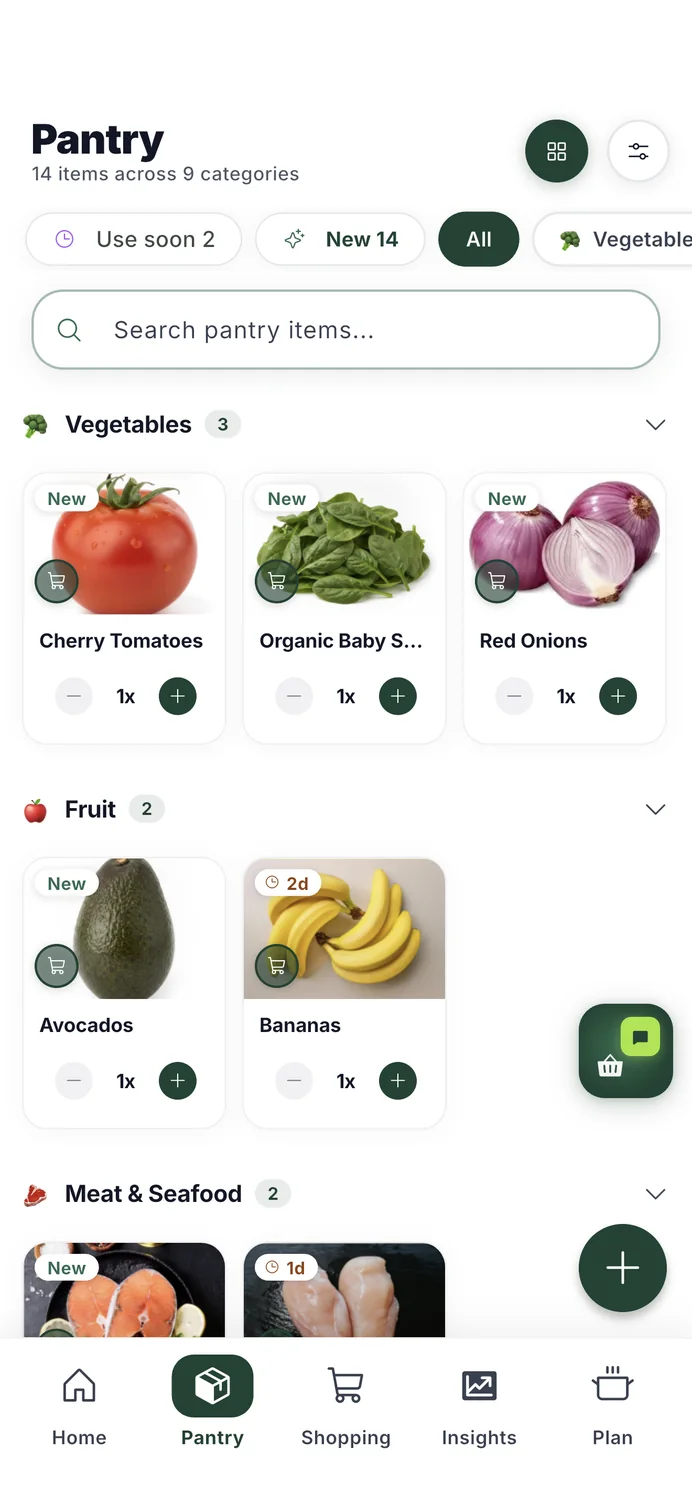
0 items forgotten this month
The HomeBasket pantry, built from a scanned receipt — every item with a photo, quantity and freshness clock.
02 · Shopping List

Next week's list
writes itself.

HomeBasket learns each item's buying rhythm from your receipts — milk every four days, oil every other week — and drafts your usuals when they come due. You just confirm.
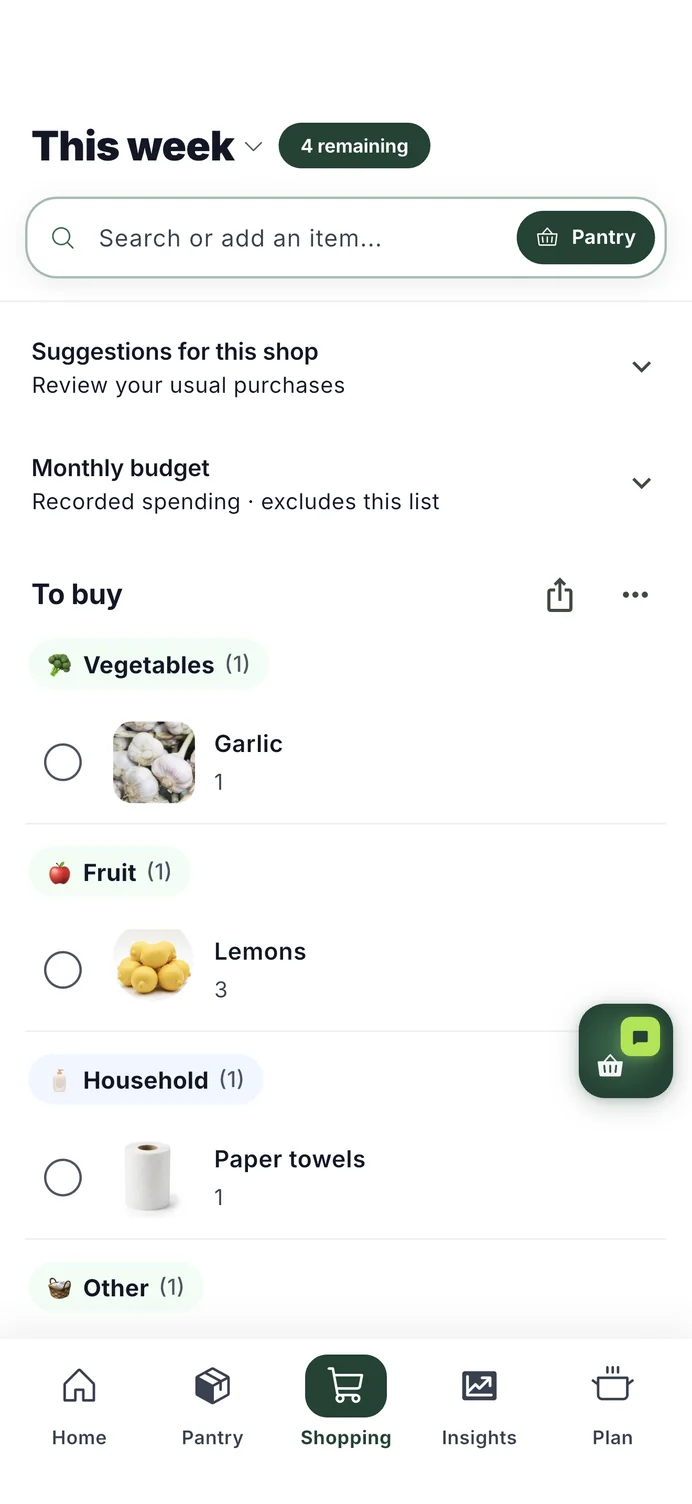
Each item knows its own rhythm — and when it's due
The HomeBasket shopping list, grouped in store-walk order with what is left to buy.
03 · Insights

You see what you're
actually buying.

Nutri-Score, full nutrition facts, and honest health notes — for every single item in your pantry. No guessing.
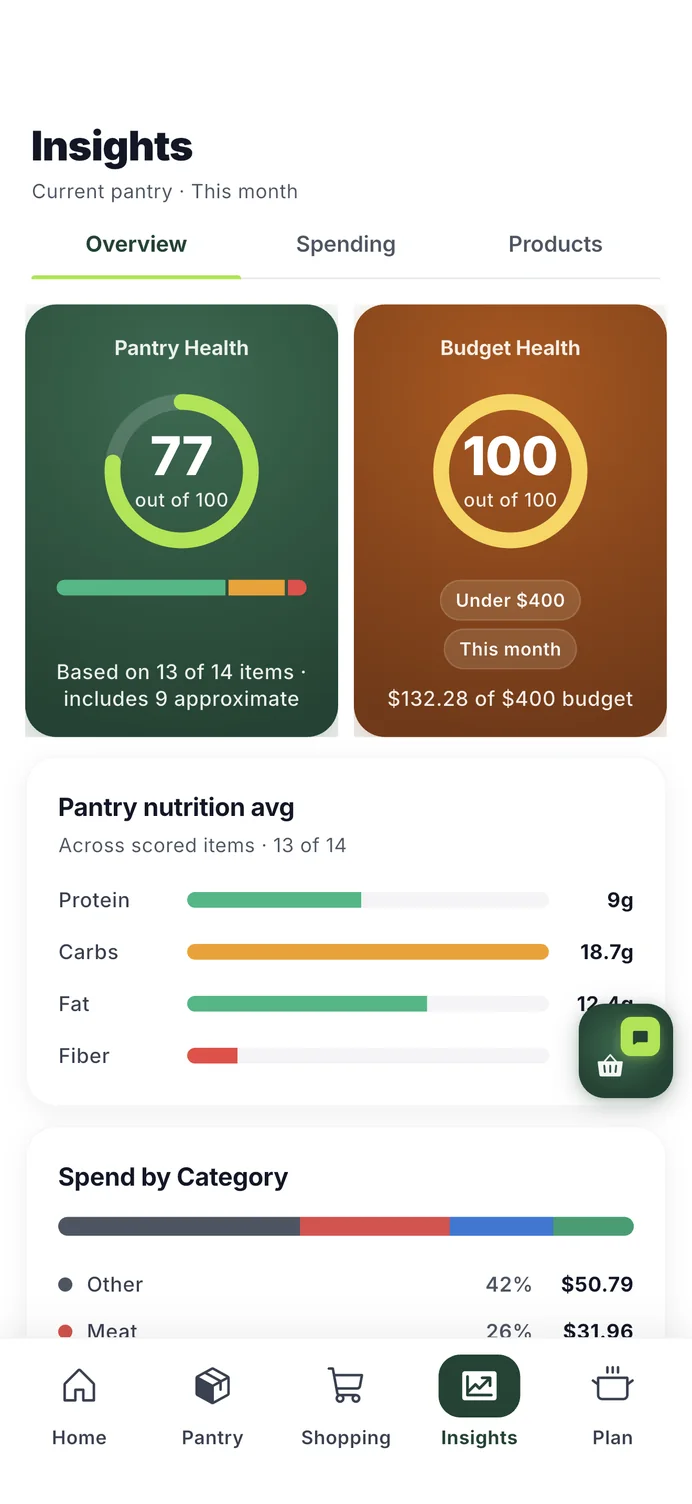
Nutri-Score for every item in your pantry
HomeBasket Insights: a pantry health score and a budget score for the month.
04 · Recipes

Cook what you
already have.

Over two thousand recipes, matched against your real pantry — cook-tonight first, one-trip next. Say how you'd like meals to lean — higher-protein, vegetable-forward, lighter plates — and suggestions are ordered that way. Saw a recipe on Instagram or TikTok? Save it, and HomeBasket tells you what you're missing.
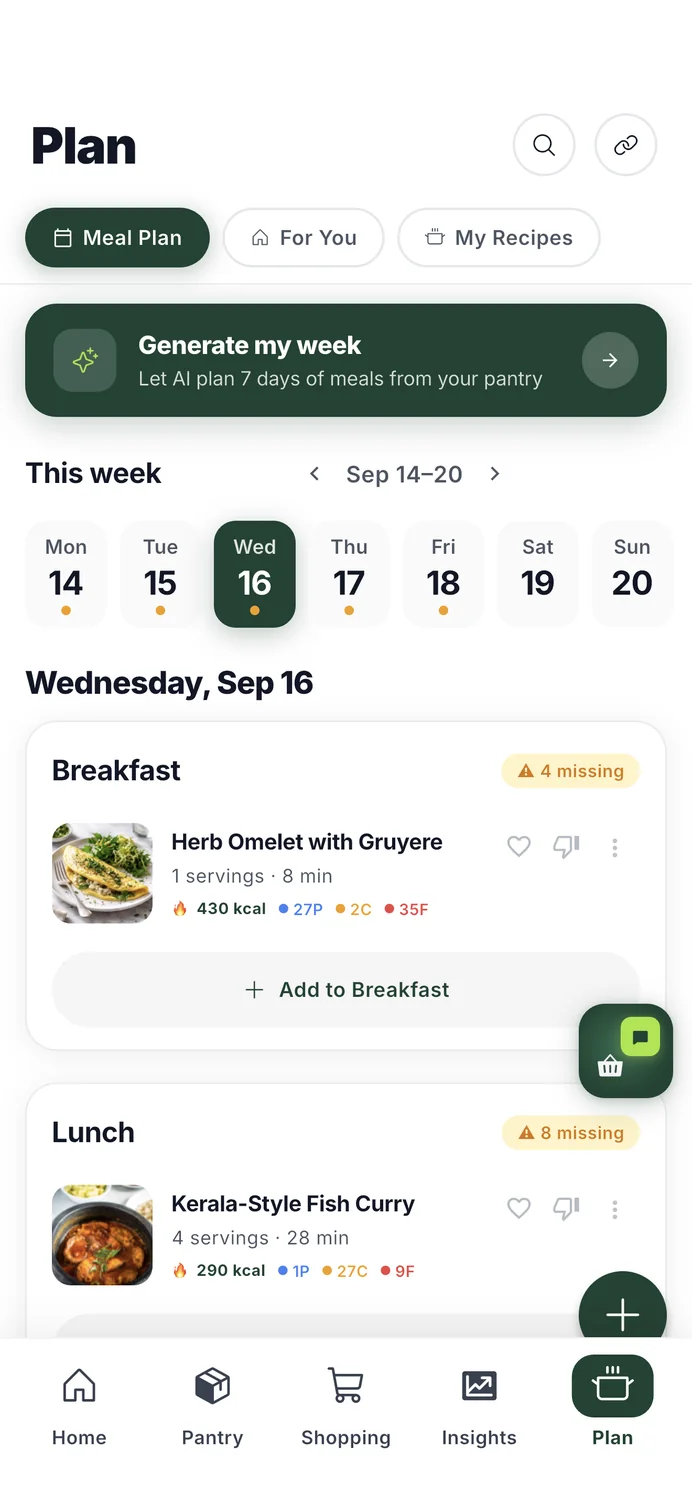
Confirm a receipt and see what it unlocked — "this shop unlocked 6 dinners"
Your leans shape the feed, the day's plan and the week
Save recipes straight from Instagram & TikTok — we check them against your pantry
A week of meals planned in HomeBasket, each dish showing its time and calories.
05 · Save from social

That reel you saved?
It's dinner now.

Share any recipe from Instagram or TikTok straight to HomeBasket. It becomes a real recipe — ingredients, steps, the creator credited — and gets checked against your pantry on arrival, so you know exactly what you're missing before you're standing in the kitchen.

Share → HomeBasket, straight from the app you're already in
Matched against what you own the moment it lands
Whatever's missing goes to your list in one tap
How saving from Instagram & TikTok works
Save recipe
Shared from Instagram
Golden lentil dhal in a terracotta bowl
Lentil Dhal
by the creator you saved it from · 25 min · serves 4
Checked against your pantry
✅ Red lentils  ·  ✅ Onion  ·  ✅ Garlic
✅ Cumin  ·  ✅ Turmeric
⚠ Missing: coconut milk
Add coconut milk to list · Save recipe
06 · Budget

Know where the money
actually went.

Your spending, by category and store, compared to your budget. No spreadsheet needed. It all flows in from your receipts.
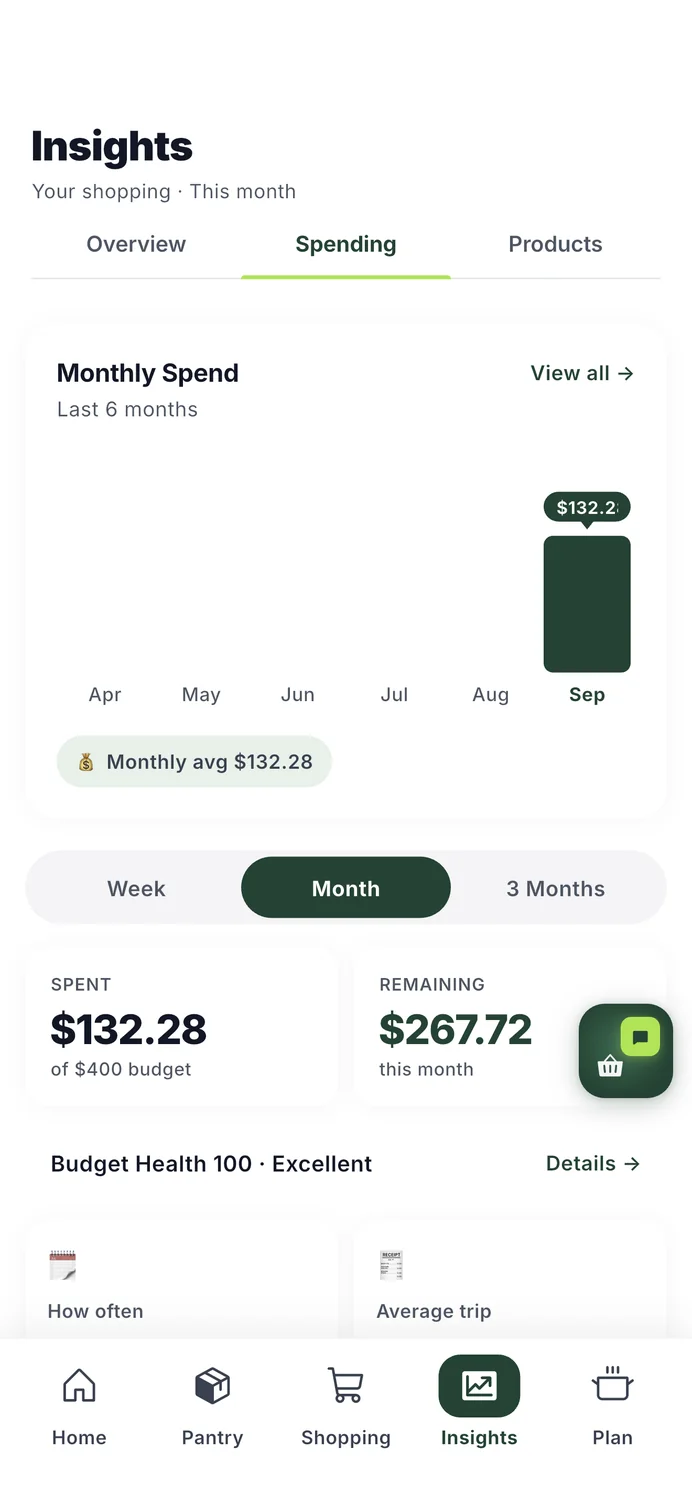
Built to pay for itself in less-wasted food
HomeBasket spending: monthly spend against the budget, by category and store.
07 · Health Score

Know what's in it,
before it's in you.

Scan any barcode and the product gets a transparent 0–100 score: Nutri-Score nutrition, flagged additives with their sources, organic certification. No black box — tap the score and see exactly why.

When a label doesn't say, we say "Score unavailable" — never a guess
Health Score
Multigrain Sandwich Bread
scanned just now
67 /100
Good
E
D
C
B
A
Nutrition
60% wt
Additives
30% wt
Organic
10% wt
1 additive flagged — E202 (potassium sorbate), moderate concern. Every flag names its source.
Recent scans
Plain Greek Yogurt B
Cola, 12-pack E
Avocados (no barcode needed) A
08 · Leans

Your shopping,
read back to you.

Say how you'd like meals to lean — higher-protein, vegetable-forward, lighter plates — and every suggestion is ordered that way. Ask for higher-protein meals and HomeBasket reads the protein share of the receipts you already scan: "This month's shopping was 20% protein, up from 17%." No calorie logging. No weigh-ins. No body data, ever.
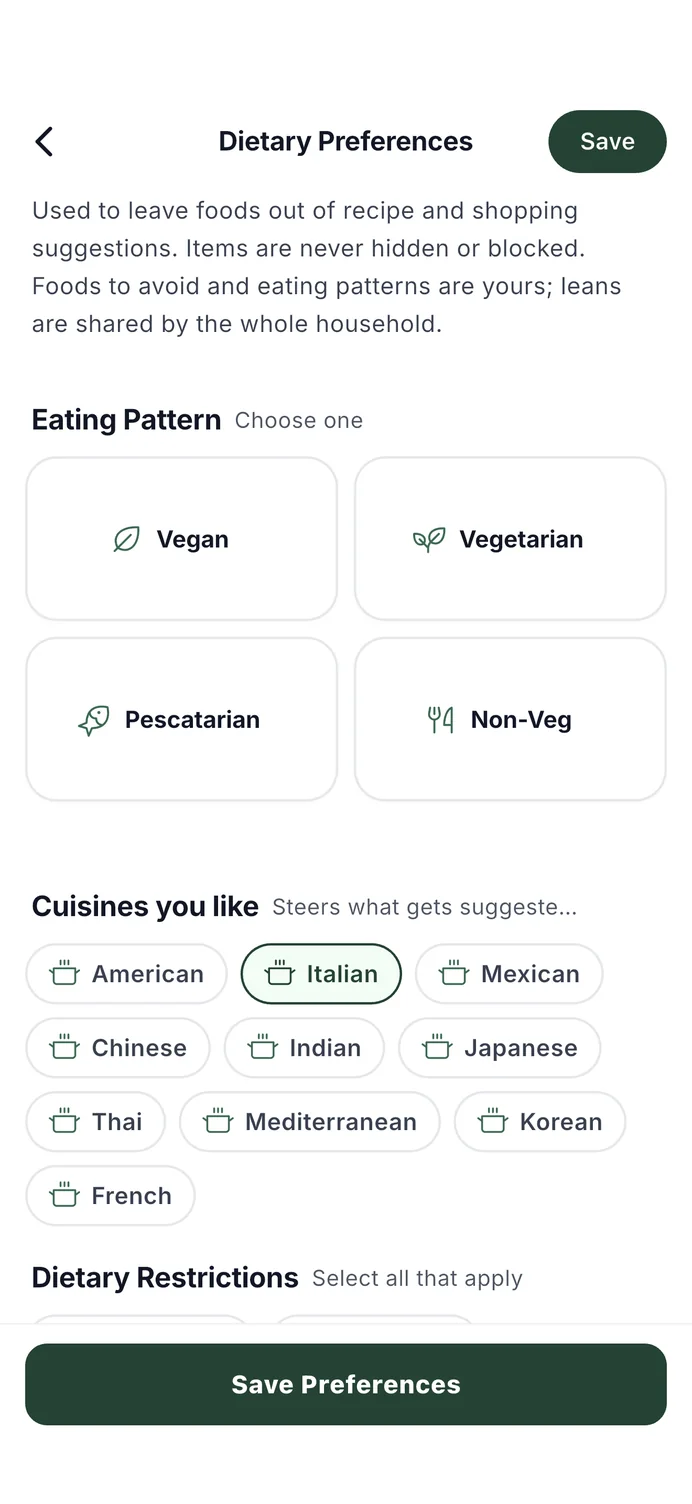
Most food trackers are abandoned in weeks — receipts keep flowing as long as you shop
HomeBasket dietary preferences — eating pattern, cuisines and what to leave out.
09 · Waste less

Use it before
it turns.

Every item gets a shelf-life estimate from the day you bought it, using USDA FoodKeeper data. When something nears its window, HomeBasket shows recipes that use it first — dinner tonight instead of the bin next week.
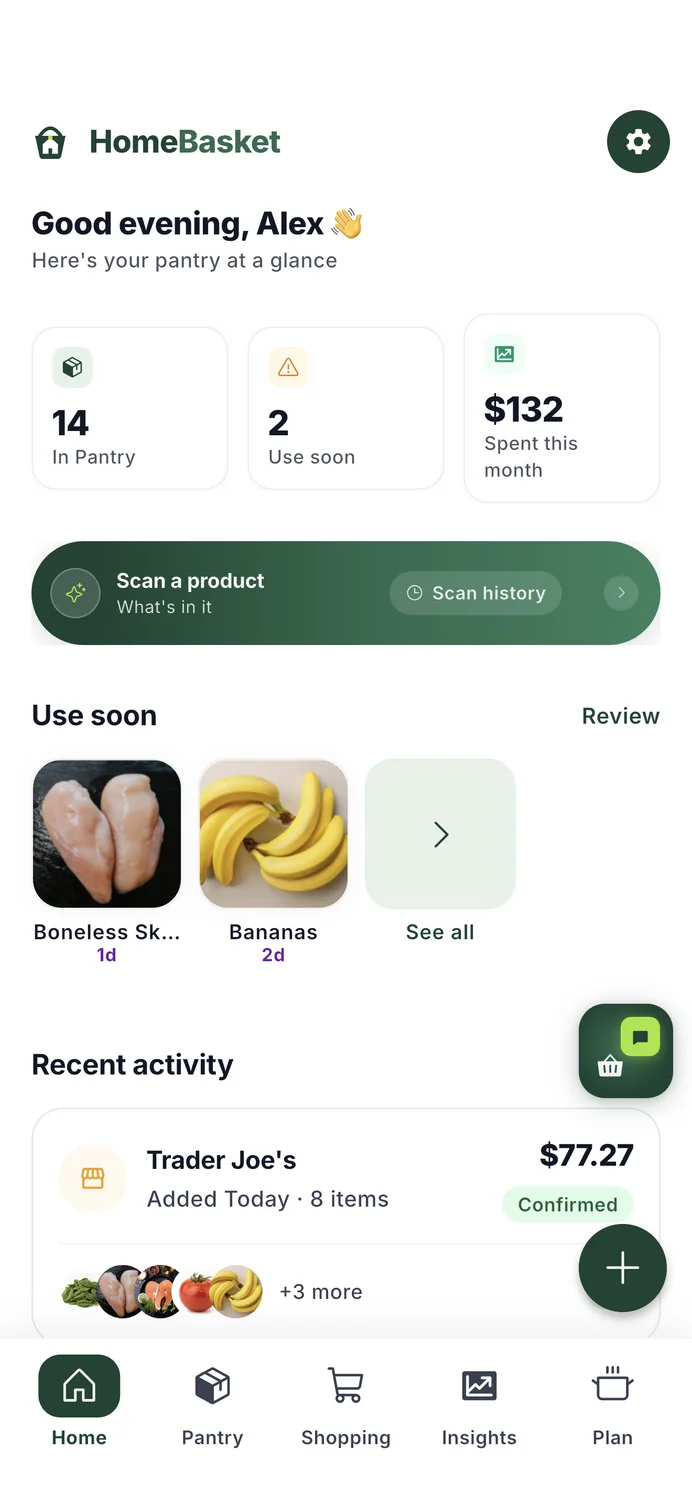
Recipes that rescue expiring food always rank above taste — waste beats preference
The HomeBasket home screen listing items to use soon, with days remaining.
2,000+
recipes, every one matched against what you actually have
13,000+
foods in the catalog, built on USDA's own data
600+
shelf lives from USDA FoodKeeper — tracked from purchase day, automatically
0–100
transparent health score on any barcode — never a guess
A different starting point

Planners start from a blank week.
We start from your shelves.

Meal-planning apps HomeBasket
Where the week starts A blank week — you pick from their catalogue, they list everything it needs Your shelves — meals you can cook tonight come first
What you buy A second set of groceries, while the first set is still in the fridge Only what the plan is missing, in the order you walk the store
How your kitchen gets in You type it, or it never happens One receipt photo after each shop — a few times a month
Your pantry A list you maintain by hand, if it exists at all Builds itself from what you actually bought
Food waste Not their problem Expiry clocks + recipes that rescue what's about to turn
What it asks about you Household size, and often weight, height and age Nothing about your body. How you'd like meals to lean, if you want to say
Radical transparency

"We'd rather say we're not sure than guess at what you ate."

⚠ Unresolved item
Score unavailable
Label data incomplete
Fix name →

We couldn't decode this one with confidence. We show you exactly that, instead of guessing and polluting your data.

✓ Resolved item
Organic Ataulfo Mango
Nutri-Score B · Produce
Score B

When we're sure, we tell you fully — the name, category, score, and full nutrition panel. Nothing invented.

HomeBasket is built around one rule: your household data should reflect reality, not our best guesses. If the receipt is illegible, we flag it. If the nutrition database has a gap, we say so.

Honesty isn't a feature. It's the default.

Plain answers

Questions we'd ask too.

How does the receipt scanning work?
Snap a photo after any shop. HomeBasket decodes the cryptic line items — "KS CONV GRYGT" becomes Kirkland Greek Yogurt — you review, fix anything in two taps, and confirm. Nothing enters your pantry without your OK.
Do I have to type in my groceries?
No — that's the point. The receipt builds the pantry, expiry estimates start from the purchase date, and your shopping list learns what you actually buy. Add the odd item by hand or barcode when you want to.
How do the recipe suggestions work?
Over two thousand recipes matched against what you actually have — cook-tonight first. Saw a recipe on Instagram or TikTok? Save it and HomeBasket tells you what you're missing. Say how you'd like meals to lean and suggestions are ordered that way.
What's the health score?
Scan any barcode and the product gets a transparent 0–100 score: nutrition, flagged additives with their sources, organic certification. When a label doesn't say, we say "Score unavailable" — never a guess.
Does it work for the whole household?
Yes. One shared pantry, one shopping list, one plan. Invite your family with a code and everyone sees the same kitchen — whoever shops, the pantry stays true.
What does it cost?
Free during early access. The long-term plan is a simple subscription — you pay for the app, and that's the business. Your shopping data is not the product and is never sold.
Early access

Get early access.

A small group of households is testing HomeBasket right now. Join the list.

Only used to tell you when it's ready. Never shared.

A few households are testing by texting me their receipts each week. Reply to the confirmation email if you'd like to be one.

You're on the list.

I'll email you when it's ready — that's the only reason I'll email you.

Something went wrong. Your email has been preserved — please try again.

Only used to tell you when it's ready. Never shared.

Costco Wholesale
Today · 15:48
KSCONVGRYGT
$7.99
ORG ATAULFO
$9.49
1068083 ORG FR EGGS
$7.69
14 items · 40 seconds
This shop unlocked 6 dinners
For everyone who gave up on a pantry app

Every pantry app
becomes a chore.

You type in your groceries for a fortnight, life happens, the inventory drifts out of date — and you stop opening it.

HomeBasket never asks you to type anything. Photograph the receipt you were about to throw away and the pantry builds itself. Then it shows you what you can cook tonight from what’s already on the shelf, leaning the way you asked — and plans the whole week when you want it to.

See how it works ↓
2,000+ recipes, matched to your pantry
Whole weeks planned around your pantry
Save recipes from Instagram & TikTok
No food diary. Ever.
Simple process

How it works

01

Snap your receipt

After any shop. Takes 10 seconds. Point your camera, tap, done.

02

Review & confirm

App translates the codes. You approve. Fix anything that's off in two taps.

03

Pantry updates itself

Freshness tracked. List auto-builds. Recipes suggested from what you own.

Four ways in

However your kitchen works,
HomeBasket keeps up.

Snap a receipt
One photo after any shop and your whole basket lands in the pantry — decoded, categorized, expiry clocks started.
Scan a barcode
Point at any package for an instant 0–100 health score with the reasons behind it. No label data? We say so.
Save from social
That reel you bookmarked? Share it to HomeBasket and we tell you what you already have and what's missing.
Just ask
“What should I cook first?” “Do we have eggs?” “How much protein am I buying?” — answered from your own kitchen, stored nowhere.
Why one app

Running a kitchen shouldn't take an app drawer.

One app to grade your food
A scanner rates one barcode at a time — and forgets it at the shelf.
One app to catch recipes
Your saved reels live where your fridge can't be seen.
One app to track the pantry
Works as long as you type in every item. Week three is where it goes quiet.
One app for the list
Starts empty every week — the other three never tell it what you have.

These were never four problems. They're one — what your household buys — and it's printed on the receipt. One photo feeds the scores, the recipes, the pantry, and the list.

01 · Pantry

Everything you own,
at a glance.

Every item you've bought, organised by category. Green dots mean fresh, amber means use soon, red means act now.

0 items forgotten this month
HomeBasket
Pantry
12 items across 4 categories
All
Fridge
Freezer
Dry Goods
Spices
3 items expiring this week
Cheddar, Broccoli, Chicken
View all ›
🧊 Fridge 7
Fresh whole milk in a glass bottle on white background
Whole Milk
2
Fresh brown eggs in a cardboard carton
Eggs
12
Sliced cheddar cheese block with orange texture
Cheddar
1
Ripe red tomatoes on the vine
Tomatoes
4
Fresh green broccoli florets on white background
Broccoli
1
Raw chicken breast on a wooden cutting board
Chicken
2
🥫 Dry Goods 5
Uncooked dry spaghetti pasta on wooden board
Pasta
2
Fresh ripe blueberries in a bowl close up
Blueberries
1
Bottle of golden extra virgin olive oil with fresh olives
Olive Oil
1
Home
Pantry
List
Insights
Recipes
02 · Shopping List

Next week's list
writes itself.

HomeBasket learns each item's buying rhythm from your receipts — milk every four days, oil every other week — and drafts your usuals when they come due. You just confirm.

Each item knows its own rhythm — and when it's due
HomeBasket
My List 6 remaining 2 done
Budget: $45 left this month
$80 of $125 spent
🧠
Nutrition tip
Your last 3 shops were high in carbs. Consider adding chicken breast or lentils.
Your list
🥦 Produce (3)
Broccoli low
2
Baby Spinach
1
Bananas
3
🥩 Meat & Dairy (2)
Chicken Breast ✨ AI
2
Greek Yogurt
1
🥫 Dry Goods (2)
Lentils ✨ AI
1
Pasta
2
🧴 Household (1)
Softsoap
1
Home
Pantry
List
Insights
Recipes
03 · Insights

You see what you're
actually buying.

Nutri-Score, full nutrition facts, and honest health notes — for every single item in your pantry. No guessing.

Nutri-Score for every item in your pantry
Insights
🥛
Whole Milk
Fridge · Dairy
2× in pantry
Nutri-Score
E
D
C
B
A
Score B — Good nutritional quality
Moderately healthy for regular consumption
Nutrition Facts per 100ml
Calories61 kcal
Total Fat
3.3g
Saturated Fat
2.1g
Protein
3.2g
Calcium
12% DV120mg
Health Insights
Good source of protein
Moderate saturated fat
Excellent calcium source (12% DV)
04 · Recipes

Cook what you
already have.

Over two thousand recipes, matched against your real pantry — cook-tonight first. Say how you'd like meals to lean and suggestions are ordered that way. Save recipes straight from Instagram or TikTok.

Confirm a receipt — "this shop unlocked 6 dinners"
Recipes
Good morning, Sarah — what shall we cook today?
🥦 Cook from your pantry 12 ingredients
We found 4 recipes you can make RIGHT NOW
Creamy pasta carbonara with egg yolk and parmesan in a white bowl close-up with steam
Pasta Carbonara
🕐 20 min
✅ All ingredients
Colorful chicken and vegetable stir fry sizzling in a wok with vibrant greens and reds
Chicken Stir Fry
🕐 25 min
✅ All ingredients
Golden fluffy veggie omelette in a skillet garnished with fresh herbs and chopped vegetables
Veggie Omelette
🕐 10 min
✅ All ingredients
For you See all →
Grilled salmon rice bowl with avocado, edamame, cucumber and soy glaze on white plate
Grilled Salmon Bowl
High Protein Low Carb
✅ 5/6 ingredients
Golden lentil dhal in a terracotta bowl with cumin seeds and warm naan bread
Lentil Dhal
High Protein
⚠ 1 missing
Home
Pantry
List
Insights
Recipes
05 · Save from social

That reel you saved?
It's dinner now.

Share a recipe from Instagram or TikTok straight to HomeBasket. It becomes a real recipe — creator credited — and gets checked against your pantry on arrival.

Whatever's missing goes to your list in one tap
How saving from Instagram & TikTok works
Save recipe
Shared from Instagram
Golden lentil dhal in a terracotta bowl
Lentil Dhal
by the creator you saved it from · 25 min · serves 4
Checked against your pantry
✅ Red lentils · ✅ Onion · ✅ Garlic · ✅ Cumin
⚠ Missing: coconut milk
Add coconut milk to list · Save recipe
06 · Budget

Know where the money
actually went.

Your spending, by category and store, compared to your budget. No spreadsheet needed. It all flows in from your receipts.

Built to pay for itself in less-wasted food
64 out of 100
64 Fair

$80 spent of $125 monthly budget

$45 remaining
16 days left
Budget used 64%
Spend vs Budget
Last 3 months
May
Jun
Jul
You're on track this month
Spend by Category
Produce35%$28
Dairy20%$16
Meat↑ 12%18%$14
Pantry15%$12
Other12%$10
Home
Pantry
List
Insights
Recipes
07 · Health Score

Know what's in it,
before it's in you.

Scan any barcode and the product gets a transparent 0–100 score: nutrition, flagged additives with their sources, organic certification. No black box.

No label data? "Score unavailable" — never a guess
Health Score
Multigrain Sandwich Bread
scanned just now
67 /100
Good
E
D
C
B
A
Nutrition
60% wt
Additives
30% wt
Organic
10% wt
1 additive flagged — E202 (potassium sorbate), moderate concern. Every flag names its source.
Recent scans
Plain Greek Yogurt B
Cola, 12-pack E
Avocados (no barcode needed) A
08 · Leans

Your shopping,
read back to you.

Say how you'd like meals to lean, and suggestions are ordered that way. Ask for higher-protein meals and HomeBasket reads the protein share of the receipts you already scan. No calorie logging. No body data, ever.

Receipts keep flowing as long as you shop
HomeBasket dietary preferences — eating pattern, cuisines and what to leave out.
09 · Waste less

Use it before
it turns.

Shelf-life estimates from the day you bought it. When something nears its window, recipes that use it first come to the top.

Rescuing expiring food outranks taste — always
The HomeBasket home screen listing items to use soon, with days remaining.
2,000+
recipes, every one matched against what you actually have
13,000+
foods in the catalog, built on USDA's own data
600+
shelf lives from USDA FoodKeeper — tracked from purchase day, automatically
0–100
transparent health score on any barcode — never a guess
A different starting point

Planners start from a blank week.
We start from your shelves.

Meal-planning apps HomeBasket
Where the week starts A blank week — you pick from their catalogue, they list everything it needs Your shelves — meals you can cook tonight come first
What you buy A second set of groceries, while the first set is still in the fridge Only what the plan is missing, in the order you walk the store
How your kitchen gets in You type it, or it never happens One receipt photo after each shop — a few times a month
Your pantry A list you maintain by hand, if it exists at all Builds itself from what you actually bought
Food waste Not their problem Expiry clocks + recipes that rescue what's about to turn
What it asks about you Household size, and often weight, height and age Nothing about your body. How you'd like meals to lean, if you want to say
Radical transparency

"We'd rather say we're not sure than guess at what you ate."

⚠ Unresolved item
Score unavailable
Label data incomplete
Fix name →

We couldn't decode this one with confidence. We show you exactly that, instead of guessing and polluting your data.

✓ Resolved item
Organic Ataulfo Mango
Nutri-Score B · Produce
Score B

When we're sure, we tell you fully — the name, category, score, and full nutrition panel. Nothing invented.

HomeBasket is built around one rule: your household data should reflect reality, not our best guesses. If the receipt is illegible, we flag it. If the nutrition database has a gap, we say so.

Honesty isn't a feature. It's the default.

Plain answers

Questions we'd ask too.

How does the receipt scanning work?
Snap a photo after any shop. HomeBasket decodes the cryptic line items — "KS CONV GRYGT" becomes Kirkland Greek Yogurt — you review, fix anything in two taps, and confirm. Nothing enters your pantry without your OK.
Do I have to type in my groceries?
No — that's the point. The receipt builds the pantry, expiry estimates start from the purchase date, and your shopping list learns what you actually buy. Add the odd item by hand or barcode when you want to.
How do the recipe suggestions work?
Over two thousand recipes matched against what you actually have — cook-tonight first. Saw a recipe on Instagram or TikTok? Save it and HomeBasket tells you what you're missing. Say how you'd like meals to lean and suggestions are ordered that way.
What's the health score?
Scan any barcode and the product gets a transparent 0–100 score: nutrition, flagged additives with their sources, organic certification. When a label doesn't say, we say "Score unavailable" — never a guess.
Does it work for the whole household?
Yes. One shared pantry, one shopping list, one plan. Invite your family with a code and everyone sees the same kitchen — whoever shops, the pantry stays true.
What does it cost?
Free during early access. The long-term plan is a simple subscription — you pay for the app, and that's the business. Your shopping data is not the product and is never sold.
Early access

Get early access.

A small group of households is testing HomeBasket right now. Join the list.

Only used to tell you when it's ready. Never shared.
A few households are testing by texting me their receipts each week. Reply to the confirmation email if you'd like to be one.

You're on the list.

I'll email you when it's ready — that's the only reason I'll email you.

Something went wrong. Your email has been preserved — please try again.

Only used to tell you when it's ready. Never shared.