
A pantry inventory app you never have to type into.
Every pantry app asks the same thing: enter your groceries, one at a time, forever. It works for about two weeks. Then real life happens and the inventory quietly becomes fiction.
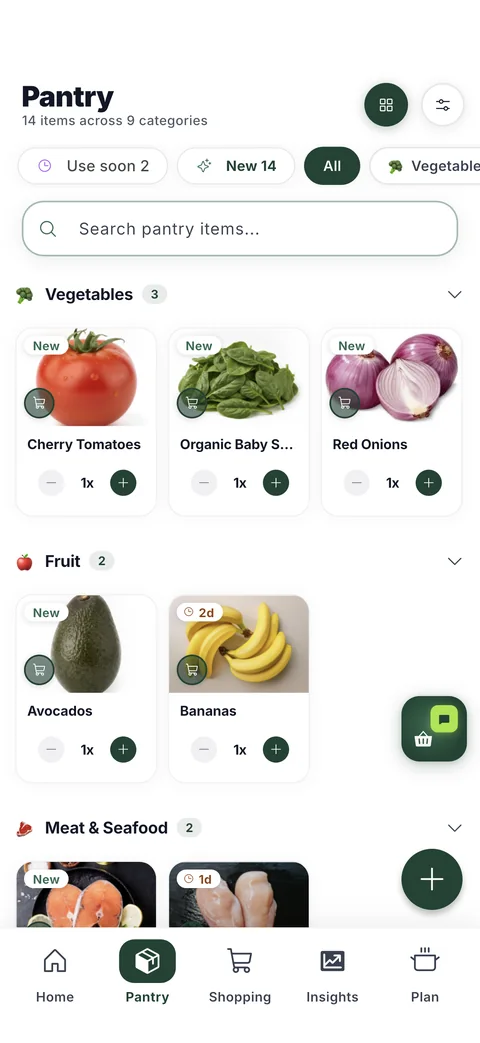
HomeBasket takes the other route. Your pantry is built from the receipts you were going to throw away, so it stays accurate for exactly as long as you keep shopping — which is to say, indefinitely. There is no weekly bookkeeping session, because there is no bookkeeping.
Everything you own, at a glance
Sorted the way a kitchen is
Items are grouped by category — produce, dairy, meat, dry goods, drinks — rather than dumped into one alphabetical list. You scan the section you care about instead of reading the whole thing.
Colour tells you the state
A green dot means fresh, amber means use soon, red means act now. You can read the health of the whole pantry without opening a single item.
Quantities that follow reality
Buying adds, using removes, and the app infers that a perishable you bought three weeks ago and never touched is probably gone. Anything it infers, you can reverse in one tap — it is a suggestion, not a decision made for you.
The parts that are genuinely hard
The same food, spelled six ways
One store's KS A2 PROTEIN MILK and another's A2 MILK are the same thing. HomeBasket resolves both to the same food so your pantry doesn't quietly hold two of everything, and where it gets it wrong you can merge the two rows yourself.
Things that aren't food
Receipts carry dish soap, batteries and paper towels. Anything that shouldn't be in a pantry can be hidden, and it stays hidden.
Staples a receipt never shows
Salt, pepper and the spices on your rack were bought months ago, if ever, on a receipt you no longer have. HomeBasket treats a sensible set of them as things you have, so recipe matching doesn't tell you to go and buy salt.
What it powers
Once the pantry is real, the rest follows: expiry tracking from the purchase date, recipes matched to what you own, a shopping list that learns each item's buying rhythm, and saved reels checked against your shelves the moment they land.
Questions
Do I have to add my groceries manually?
No, that is the point of it. The receipt builds the pantry. You can add the odd item by hand or by barcode when you want to, but it is never the main way in.
How does it know what I have used?
Buying adds and using removes, and you can mark something used up in one tap. For perishables that were bought long ago and never touched, HomeBasket infers they are gone and shows you what it cleared, so you can put anything back that it got wrong.
Does it work for a shared household?
Yes. A household can have more than one member, and everyone sees the same pantry, shopping list and spending. Receipts stay private to that household.
What about food I did not buy at a supermarket?
Add it by hand or by barcode. The receipt is the fast path, not the only path.
Can I correct something that came in wrong?
Yes. You can rename an item, change its quantity or storage, merge two rows that are the same food, or hide something that should not be in a pantry at all.
Get early access
HomeBasket is in testing with a small group of households. Join the list and we'll tell you when it opens up.
Join the waitlistFree to start. Your receipts stay private to your household.
More about HomeBasket: How the receipt becomes a pantry · Tracking what is about to turn · Cooking from what is on the shelf · why we built it