
A meal planner that starts from what you already own.
Most meal planners start from a blank week and hand you a shopping list for everything in it. You end up buying a second set of groceries while the first set is still in the fridge.
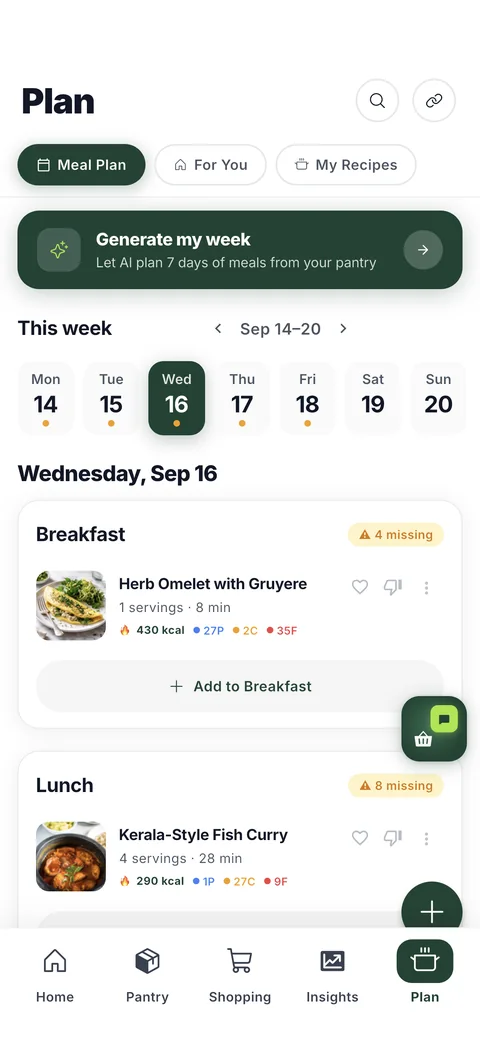
HomeBasket plans the other way round. It builds the week from the food already on your shelves, orders it the way you asked meals to lean, and only then works out what you actually still need to buy.
What the plan is built from
Your actual pantry
Candidates come from what your receipts say you own, so the week leans on food that is already paid for. Recipes you can cook tonight outrank recipes that need a full shop.
How you want meals to lean
Choose up to two — higher-protein meals, vegetable-forward meals, lighter plates — and candidates are ordered that way. A lean re-orders suggestions and hides nothing, and the plan tells you which ones acted, so you are never guessing whether the setting did anything.
Whatever is about to turn
Food near the end of its shelf life is pushed into the week ahead of food that will keep. Waste beats preference, deliberately.
What you actually eat
Set cuisines you like and foods you avoid, and the week respects both. Automated planning never puts something you avoid on a plate.
You confirm it, not the app
Swap anything before it counts
The generated week is a draft. Any meal can be swapped for another, and the shopping list is rebuilt from whatever you settled on — not from the plan the app first proposed.
It says how much it filled
A week is not always fillable from one pantry, so the review names the number: how many slots were filled, how much of the ingredients you already have, and how much is still to buy. An honest partial week beats a full one padded with things you do not want.
The list follows the plan
Confirm, and everything missing lands on your shopping list in the order you walk the store. That is the whole handoff — no re-entering ingredients.
Planning by hand still works
Nothing forces you through generation. You can build a week yourself from the same pantry-matched recipes, drop in anything you saved from Instagram or TikTok, and get the same shopping list at the end.
What it will not do
It will not ask you to log meals, weigh food, or keep a diary — and it will not set you a daily calorie or macro target, because a household is not one person and we never see what anyone actually ate. The plan is built from your receipts and your settings. There is no calorie counting to keep up with, because keeping it up is the thing everybody stops doing.
Questions
Does the meal planner use food I already have?
That is the starting point. Candidate meals are drawn from what your receipts say is in your pantry, and recipes you can cook without shopping are ranked above ones that need a full trip.
Can I tell it how I want meals to lean?
Yes. Choose up to two leans — higher-protein meals, vegetable-forward meals or lighter plates — and candidates are ordered that way inside what your pantry can cook. It re-orders suggestions and hides nothing. There is no meal logging and no daily target.
What if I do not like what it picked?
Swap it. The generated week is a draft until you confirm, and the shopping list is built from your final choices rather than the original suggestion.
Does it handle a whole household?
Yes. Plans, pantry, shopping list and spending are shared across the household, and foods any member avoids are kept off the plan.
Do I have to use the generator?
No. You can plan a week by hand from the same pantry-matched recipes and still get the shopping list at the end.
Get early access
HomeBasket is in testing with a small group of households. Join the list and we'll tell you when it opens up.
Join the waitlistFree to start. Your receipts stay private to your household.
More about HomeBasket: Recipes matched to your pantry · The pantry it plans from · Why expiring food gets planned first · why we built it